
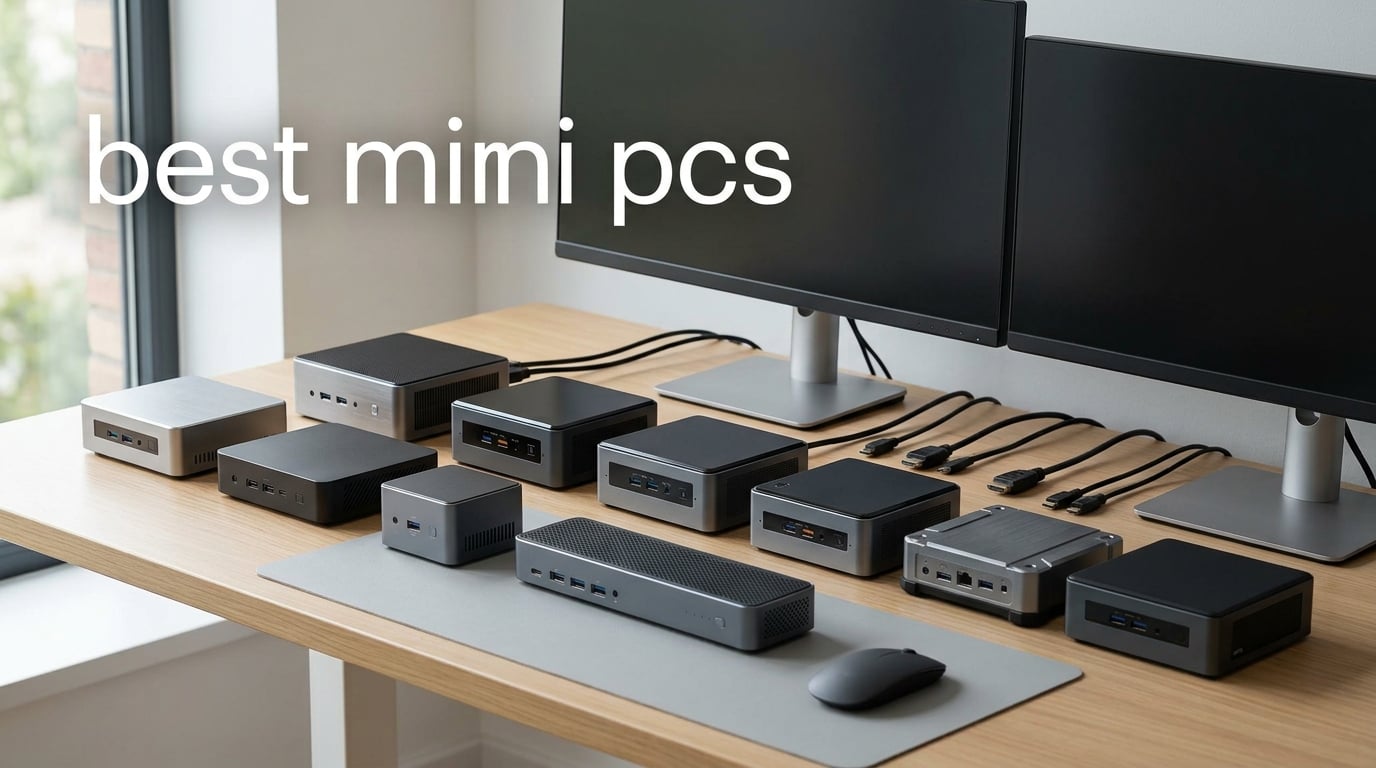
The best mini PCs put a real desktop on a crowded desk, behind a monitor, or beside a television without asking you to accept a slow, stripped-down experience. A mini PC is a compact desktop computer, commonly about four to eight inches across, with laptop-class components, external display support, and far lower space demands than a tower.
I approached this list by matching the supplied configurations to real jobs: documents and video calls, multi-monitor work, media playback, software development, storage-heavy work, local AI features, and casual games. The right choice is not simply the model with the biggest processor label; memory limits, cooling, display outputs, storage bays, network ports, and operating-system setup all change what a small PC feels like day to day.
For readers comparing Apple-style desktop simplicity with Windows and Linux flexibility, our guide to Mac Mini alternatives is a helpful companion. A mini computer desktop also makes sense when a full tower would dominate a shared room, a reception area, a dorm desk, or a home-theater shelf.
The product data here covers twelve current configurations, rather than treating a product family as one vague recommendation. I have called out fixed versus upgradeable memory, the difference between USB-C and USB4, and why integrated graphics can be excellent for lighter games but are not a substitute for a dedicated graphics card in demanding new titles.
Table of Contents
Top 3 picks for the best mini PCs answer most shoppers quickly
The GMKtec K12 is my overall pick because its Ryzen 7 H 255, Radeon 780M graphics, 32GB of DDR5 memory, triple M.2 expansion, dual 2.5GbE networking, and Oculink port give it an unusually broad path from desk work to external-GPU experimentation. The GEEKOM A6 is the more conventional workhorse: it pairs a 45W Ryzen 7 6800H with upgradeable memory, a 1TB PCIe 4.0 SSD, USB4, and a three-year limited warranty.
For straightforward office, school, browser, and media duties, the DreamQuest Mini Plus is the sensible entry point. Its Intel N95 is not for serious rendering or current AAA games, but 12GB DDR5, 512GB storage, Windows 11 Pro, Wi-Fi 6, dual HDMI, and two USB-C ports cover a surprising number of light desktop setups.
Best mini PCs in 2026 compare their strengths at a glance
The table below puts every reviewed model in one place. Use it to narrow the field, then read the individual sections for the limits that a short specification line cannot show, such as soldered memory, second-drive options, cooling approach, or whether you must install your own operating system.
| Product | Specifications | Action |
|---|---|---|
 GMKtec K12 GMKtec K12 |
|
Check Latest Price |
 GMKtec M2 Pro GMKtec M2 Pro |
|
Check Latest Price |
 GMKtec K15 AI GMKtec K15 AI |
|
Check Latest Price |
 GMKtec K13 GMKtec K13 |
|
Check Latest Price |
 ACEMAGIC K1 ACEMAGIC K1 |
|
Check Latest Price |
 GMKtec K17 GMKtec K17 |
|
Check Latest Price |
 KAMRUI Pinova P2 KAMRUI Pinova P2 |
|
Check Latest Price |
 GEEKOM A6 GEEKOM A6 |
|
Check Latest Price |
 BOSGAME P4 Ultra BOSGAME P4 Ultra |
|
Check Latest Price |
 Beelink SER5 MAX Beelink SER5 MAX |
|
Check Latest Price |
 DreamQuest Mini Plus DreamQuest Mini Plus |
|
Check Latest Price |
 BOSGAME P3 BOSGAME P3 |
|
Check Latest Price |
1. GMKtec K12 is the best mini PC for expansion and integrated-graphics gaming
GMKtec K12 Gaming Mini PC Oculink AMD Ryzen 7 H 255 (Upgraded 8745HS) 32GB DDR5 RAM 512GB SSD, Desktop Computer Radeon 780M Graphics, 3X M.2 2280 Storage Expansion, Dual NIC 2.5G, HDMI 2.1, USB4
Ryzen 7 H 255
32GB DDR5
Radeon 780M
Oculink
Pros
- 32GB DDR5 included
- Triple M.2 expansion
- Oculink eGPU port
- Dual 2.5GbE
Cons
- One HDMI port
- No dedicated GPU
The K12 is the most flexible machine in this group for someone who wants a compact PC that can change jobs over time. Its eight-core, 16-thread Ryzen 7 H 255 reaches up to 4.9GHz, while the Radeon 780M runs at up to 2,600MHz; that pairing is a strong foundation for creative software, emulation, older and esports games, and demanding multitasking.
I particularly like that GMKtec starts with 32GB DDR5-5600 rather than making memory the first upgrade. The 512GB PCIe 4.0 drive is modest for a game library, but three M.2 2280 slots allow substantially more storage later, with the listing stating support for up to 24TB total.
Display and network connectivity are unusually good for a small form factor PC. HDMI 2.1, DisplayPort 1.4, and USB4 can serve a multi-display desk, while dual 2.5GbE ports suit fast local storage, a home lab, or separate networks.
The K12 is best when gaming headroom and storage growth matter
The Radeon 780M is integrated graphics, so I would treat 1080p as the natural target and adjust quality settings game by game. It is not a promise of smooth 1440p or 4K performance in every modern game, yet it is one of the more capable integrated options represented here.
Oculink is the K12’s distinguishing connection. It offers PCIe x4 bandwidth for an external GPU setup, so a buyer planning a desk-bound gaming station has a clearer upgrade path than with USB-only mini PCs; check enclosure, card, cable, and operating-system compatibility before committing.
The K12 needs a buyer comfortable with a larger enthusiast-oriented box
At 7 by 7 by 5 inches, this is not the smallest unit in the roundup. Dual cooling fans, RGB lighting, six USB ports, and expansion space explain the footprint, but it is better on a desk or shelf than hidden behind a slim monitor.
Forum discussions repeatedly flag sustained-load temperatures and fan noise as concerns with lesser-known mini PC brands. GMKtec lists 35dB cooling and dual fans here, but I would still buy from a seller with a return process you trust and test your own workload during that window.
2. GMKtec M2 Pro is a compact triple-display office machine
GMKtec Mini PC Intel Core i7-1185G7 (Up to 8 GHz) 16GB DDR4 1TB SSD
Core i7-1185G7
16GB DDR4
1TB SSD
Triple 4K
Pros
- 1TB SSD included
- Three display outputs
- Compact size
- Memory expands to 64GB
Cons
- Older processor
- DDR4 memory
- No Oculink
The M2 Pro is built around Intel’s Core i7-1185G7, a four-core, eight-thread processor with a listed boost up to 4.8GHz. It is an older platform than the Core Ultra and newer Ryzen systems here, but it remains a practical mini desktop computer for browser-heavy work, spreadsheets, video calls, coding, and 4K streaming.
A 1TB NVMe SSD is a welcome starting point for documents, photos, and local files. The 16GB DDR4 memory is upgradeable to 64GB, which is a meaningful advantage for users who begin with routine office work and later add virtual machines or heavier development tasks.
I would also give this model credit for physical neatness: it measures 4.47 by 4.17 by 1.67 inches, weighs 2.9 pounds, and includes a VESA mount. Two HDMI ports plus USB-C support three 4K displays at 60Hz, a useful setup for analysts, trading dashboards, or a home office that needs side-by-side documents.
The M2 Pro is best for desk productivity and 4K media
Iris Xe G7 graphics are sufficient for desktop acceleration, video playback, and light creative work, not a choice for recent graphics-intensive games. For an office machine, that trade brings a reasonable 35W listed power draw and avoids paying for graphics capability you will not use.
The 2.5Gbps Ethernet port, Wi-Fi 6, Bluetooth 5.2, and five USB ports cover the common peripheral list without a dock. Wake on LAN is also useful if the computer will sit behind a monitor or in a small business cabinet.
The M2 Pro is less suitable when newer graphics and high-speed expansion matter
The hardware does not offer Oculink, and the product data does not describe a full-featured USB4 connection. Buyers considering an external GPU, high-bandwidth storage workflow, or integrated gaming beyond lighter titles should start with the K12, K13, K17, A6, or P3 instead.
Because this system uses DDR4 and an 11th-generation Intel processor, I would choose it for a clearly defined productivity role rather than as a long-horizon performance project. Its small case and triple-display layout are the main reasons to select it.
3. GMKtec K15 AI is the efficient mini PC for local AI and connectivity
GMKtec K15 AI Mini PC Oculink Intel Ultra 5 125U 32GB DDR5 512GB SSD
Core Ultra 5 125U
32GB DDR5
AI Boost
Oculink
Pros
- 32GB DDR5
- Intel AI Boost
- Oculink expansion
- Dual 2.5GbE
Cons
- 512GB base SSD
- Integrated graphics
- One HDMI port
The K15 AI combines an Intel Core Ultra 5 125U with Intel AI Boost, 32GB DDR5-5600 memory, and a listed 15W TDP. That is a sensible recipe for an always-on compact PC focused on office multitasking, light local AI-assisted features, and low-energy operation rather than maximum integrated-game frame rates.
I appreciate that it also provides three M.2 2280 slots, even though the installed PCIe 4.0 SSD is 512GB. A machine used for local models, photo catalogs, containers, or a growing project folder can consume storage fast, so having expansion room is more useful than a single large fixed drive.
The K15 can drive displays through HDMI 2.1, DisplayPort 1.4, and USB-C, and GMKtec describes four-display capability. Dual 2.5GbE, Wi-Fi 6E, Bluetooth 5.2, and seven USB ports make it well suited to a wired office, a small server corner, or a hardware-filled development desk.
The K15 AI is best for efficient workstations with fast wired networking
The processor and AI Boost are relevant if your software supports Intel’s NPU path, but an NPU badge alone does not make every application faster. I would check the actual tools you use, particularly for image, transcription, or local-assistant workflows, before making that the deciding factor.
The Oculink port is the more lasting flexibility feature. It gives a future external-GPU route while leaving USB4 and the other display outputs available, which is valuable for someone who wants compact daily computing without ruling out a more specialized desk setup.
The K15 AI is less suitable for buyers chasing the strongest integrated graphics
Intel integrated graphics here are a weaker gaming proposition than the Radeon 780M in the K12 or P3, based on the supplied product notes. The K15 makes more sense for responsive productivity, connectivity, and storage expansion than for treating a tiny system as a console replacement.
As with other dual-fan GMKtec systems, fans and RGB lighting may be noticeable under a long export or compilation. Leave breathing room around the chassis rather than placing it in a closed media cabinet.
4. GMKtec K13 is the most compact high-connectivity AI-focused choice
GMKtec K13 Mini PC Intel Ultra 7 256V SK Hynix LPDDR5 8533 MT/s
Core Ultra 7 256V
Arc 140V
Dual USB4
5GbE
Pros
- Arc 140V graphics
- Two USB4 ports
- 5GbE networking
- Very compact
Cons
- Fixed 16GB memory
- 512GB storage
- Shared USB4 bandwidth
The K13 packs the Intel Core Ultra 7 256V, Intel Arc 140V graphics, and 16GB of very fast SK Hynix LPDDR5 memory into a 3.94-inch cube. This is the mini computer I would shortlist for a tidy desktop that needs modern ports, good media capability, and Intel’s higher-end local AI specifications without a bulky enclosure.
GMKtec lists 115 TOPS of combined AI performance, including 47 TOPS from the NPU. That figure is useful for comparing supported AI-capable systems, but I would not treat it as a universal measure of app speed; software support, memory capacity, and model size remain important.
For peripherals, the K13 is unusually well equipped. Two USB4 ports run at 40Gbps and support 100W power delivery, while 5GbE Ethernet offers more network bandwidth than the common 2.5GbE ports elsewhere in this guide.
The K13 is best for a compact multi-monitor and fast-network desk
HDMI 2.1 plus two USB4 ports support three 4K displays, and the listing describes 8K capability. I would pair it with a clean USB4 dock only after mapping bandwidth needs, because the supplied notes state that USB4 bandwidth is shared when multiple ports are active.
Arc 140V adds hardware ray tracing, XeSS upscaling, and AV1 encoding, making it more interesting for media and lighter games than older basic Intel graphics. Still, integrated graphics means realistic settings and resolution choices matter more than a marketing feature list.
The K13 is a poor fit when memory capacity must grow
The 16GB LPDDR5 memory is not upgradeable. That is enough for ordinary work, media, and many development tasks, but I would not choose it for a heavy virtual-machine workflow, large local AI models, or long-term creator work that already approaches that memory limit.
Storage is less restrictive because there are dual Gen4 NVMe slots with a listed 16TB total ceiling. A second drive can separate project files from the operating system, but it cannot compensate for soldered RAM.
5. ACEMAGIC K1 is the practical Windows mini PC for basic office tasks
ACEMAGIC Mini PC Windows 11 Pro AMD Ryzen 7330U 16GB DDR4 RAM 256 SSD 28W
Ryzen R2544
16GB DDR4
256GB SSD
Windows 11 Pro
Pros
- Windows 11 Pro
- Triple display
- VESA mount
- Three-year warranty
Cons
- 256GB storage
- Older wireless
- No USB4
The ACEMAGIC K1 answers the needs of a basic Windows 11 Pro workstation without pretending to be a workstation-class renderer. Its four-core Ryzen R2544 reaches up to 3.7GHz, has 16GB DDR4, and handles routine documents, web research, messaging, remote access, and 4K media playback well within its intended class.
I like the built-in power supply because it removes one external brick from a small desk or display installation. The metal body, supplied VESA mount, and 5.04 by 5.04 by 1.61 inch dimensions make it a straightforward fit behind a monitor or in a reception setup.
It supports three 4K displays through HDMI 2.0, DisplayPort 1.4, and USB-C. Six USB ports and Gigabit Ethernet are enough for a keyboard, mouse, webcam, printer, wired network, and basic accessories without demanding a hub.
The K1 is best for administrative work and fixed business screens
Windows 11 Pro preinstalled is useful for buyers who want to begin with a familiar operating system rather than provision one. The three-year warranty is also notable in this group and worth factoring into a business deployment where support matters as much as a benchmark figure.
The Ryzen R2544 is listed as outperforming the N150 by more than 28%, so it has headroom beyond the most basic Intel N-series systems. That makes it a sound small PC for browser-based business platforms and a typical home office.
The K1 is limited by storage and older wireless hardware
The installed 256GB M.2 SSD will fill quickly with local media or a large software stack. There is an M.2 expansion route up to 2TB, so I would plan storage early rather than waiting until Windows begins warning about free space.
Wi-Fi 5 and Bluetooth 4.2 are older standards than the Wi-Fi 6E and Bluetooth 5.2 or 5.4 options in several competitors. A wired Ethernet connection is the better choice for a stable desk installation.
6. GMKtec K17 is the strongest compact choice for supported local AI features
GMKtec K17 AI Mini PC Intel Core Ultra 5 226V LPDDR5X 8533MT/s 97 Tops AI
Core Ultra 5 226V
97 TOPS AI
1TB SSD
USB4
Pros
- 97 TOPS AI performance
- 1TB SSD
- Dual M.2 slots
- USB4 and Wi-Fi 6E
Cons
- Fixed 16GB memory
- One-year warranty
The GMKtec K17 centers on a Core Ultra 5 226V with a dedicated NPU and a listed 97 TOPS of AI performance. Its Intel Arc 130V graphics add hardware ray tracing, XeSS, and AV1 encoding, making this a more complete modern compact PC than a simple NPU-only office machine.
Its standard 1TB PCIe 4.0 SSD is generous for a compact desktop, and the dual M.2 layout includes one Gen5 and one Gen4 slot with a listed capacity up to 16TB. That is a useful combination for local media, a project archive, or data that benefits from faster storage access.
USB4 runs at 40Gbps with power delivery and DisplayPort output. Add 2.5GbE, Wi-Fi 6E, and support for up to three 8K displays, and the K17 has the connections I would expect from a system positioned for current productivity and creative setups.
The K17 is best for an AI-capable desktop that starts with ample storage
Many prospective buyers care less about experimental AI workloads than about not running out of space. The 1TB drive gives the K17 a better out-of-box storage position than systems that arrive with 512GB, while the second slot keeps a later expansion simple.
The Arc 130V can help with media tasks that call on hardware encoding, and its AI-oriented architecture can matter in compatible applications. Treat those advantages as workload-specific rather than an automatic reason to replace a dedicated GPU workstation.
The K17 needs buyers to accept fixed memory and a shorter warranty
The 16GB LPDDR5X-8533 memory is onboard and not upgradeable. It is fast, but capacity is the limit that matters when many browser tabs, large design files, containers, or virtual machines run together.
GMKtec lists a one-year limited warranty. Community feedback often gives weight to support quality and long-term reliability, so I would retain order records, update the system after setup, and test displays, Wi-Fi, ports, and sleep behavior early.
7. KAMRUI Pinova P2 is a compact home and business desktop with display flexibility
KAMRUI Pinova P2 Mini PC, AMD Ryzen 7330U(4 Cores, 8 Threads, Up to 4.3GHz), 16GB RAM 256GB SSD, Zen3 Architecture 7nm Processor, 8MB L3 Smart Cache Mini Computers,Triple 4K Display Home/Business
Ryzen 7330U
16GB RAM
256GB SSD
Triple 4K
Pros
- Triple 4K output
- Dual storage expansion
- VESA mount
- Quiet cooling
Cons
- No operating system preinstalled
- 256GB base storage
The Pinova P2 uses AMD’s Ryzen 7330U, a Zen 3 four-core, eight-thread processor with a stated boost up to 4.3GHz. This is a balanced compact PC for everyday productivity, cloud tools, coursework, video calls, and multiple displays, not a mini PC for gaming that should be judged against systems with Radeon 780M graphics.
It has 16GB LPDDR4X memory and a 256GB M.2 SSD, along with two additional storage expansion options. That design makes more sense for a buyer who needs light everyday responsiveness now and wants room for files later than for a person who needs huge storage on day one.
The 5.04 by 5.04 by 1.63 inch chassis includes a VESA mount and quiet cooling. It can drive three 4K displays at 60Hz using HDMI 2.0, DisplayPort 1.4, and USB-C with DisplayPort Alt Mode.
The Pinova P2 is best for a simple multi-monitor home office
A laptop-style work desk often benefits more from separate monitor space than raw processor power. The P2’s triple-display configuration lets a user keep communication, research, and documents visible, provided their monitors and cables match the available ports.
Its USB 3.2 Gen2 Type-C port supports 10Gbps transfer and DisplayPort Alt Mode. That is practical for an external SSD or one display, though it is not the same category of connection as 40Gbps USB4.
The Pinova P2 requires an operating-system plan and storage planning
The listing describes the system as Windows compatible rather than including Windows. I would only recommend it to someone ready to install and license an operating system, or to set up a supported Linux distribution.
The 256GB starting drive will be comfortable for browser-based work and documents but not for a large Steam library, extensive photo archive, or video-editing cache. Use the extra M.2 slots to grow storage rather than relying on a crowded primary drive.
8. GEEKOM A6 is the best all-around mini PC for demanding office work
GEEKOM A6 Mini PC, Ryzen 7 6800H, 16GB DDR5 Upgradable RAM 1TB PCIe 4.0 SSD
Ryzen 7 6800H
16GB DDR5
1TB SSD
USB4
Pros
- 45W Ryzen performance
- Upgradeable memory
- 1TB Gen4 SSD
- Three-year warranty
Cons
- Heavier chassis
- Integrated graphics only
The GEEKOM A6 earns its all-around place through a 45W Ryzen 7 6800H, 16GB DDR5, and a 1TB PCIe Gen4 SSD. The processor is an eight-core model that reaches up to 4.7GHz, giving a home office or small business noticeably more breathing room for large spreadsheets, coding, multitasking, and longer CPU-heavy tasks than low-wattage alternatives.
I also like that memory can be upgraded to 64GB. That is a major practical difference from compact systems with fast but fixed LPDDR5; a buyer can begin with a normal workload and expand later if projects, browser sessions, or virtual machines demand it.
The aluminum alloy chassis is 4.41 by 4.41 by 2.05 inches and weighs 1.1kg, so it is not the lightest option, but it remains genuinely small. GEEKOM lists cooling under 35dB, Wi-Fi 6E, Bluetooth 5.2, 2.5GbE, USB4, and a supplied VESA mount.
The A6 is best for workstations that need CPU strength and upgradeable RAM
The Ryzen 7 6800H has a 45W TDP, which matters when workloads run for more than a few seconds. I would pick this system for software development, big office files, photo work, and general creative tasks where sustained processor output is more important than the smallest possible case.
Its quad-display support comes from USB4, dual HDMI 2.0, and USB 3.2. That gives users considerable flexibility for monitors, capture hardware, and storage, while the 1TB drive removes the immediate need for an upgrade.
The A6 is less compelling for ultralight travel or discrete-GPU gaming
The Radeon 680M graphics can play lighter titles and accelerate media work, but it does not turn the A6 into a no-compromise gaming rig. Set expectations around 1080p, sensible graphics settings, and the particular games you play.
The 1.1kg body is still easy to place on a desk, yet buyers focused on a hidden display mount or frequent transport might prefer the smaller K13. I consider the A6’s extra bulk a fair trade for its higher-wattage processor and upgrade path.
9. BOSGAME P4 Ultra is the mini PC for home servers and storage-friendly work
BOSGAME P4 Ultra Mini PC Ryzen 7 7730U 16GB DDR4 1TB PCIe SSD
Ryzen 7 7730U
16GB DDR4
1TB SSD
Dual 2.5GbE
Pros
- Eight-core processor
- 1TB SSD
- Dual 2.5GbE
- RAM upgrade support
Cons
- No operating system included
- DDR4 memory
The BOSGAME P4 Ultra has a Ryzen 7 7730U with eight cores and 16 threads, 16GB DDR4, and a 1TB PCIe SSD. That specification suits a small PC that does ordinary desktop work during the day and runs network-heavy jobs, home services, or storage tasks when it is not being used interactively.
Dual 2.5Gbps Ethernet is the headline feature. I would look at this model for a NAS-adjacent desktop, a home-lab machine, a firewall or network test environment, or a workstation that frequently moves files to local storage faster than a Gigabit connection permits.
The RAM can reach 64GB and a second M.2 slot is available. Those upgrades, plus triple 4K output through HDMI, DisplayPort, and Type-C, make the P4 Ultra more adaptable than a small system with fixed memory and only one drive bay.
The P4 Ultra is best for wired networks and expandable home setups
Wi-Fi 6E and Bluetooth 5.2 complement the wired ports, but the dual 2.5GbE arrangement is why this product stands out. A desktop connected to a fast switch and compatible storage can make backups, video assets, and large project transfers much less tedious.
It supports Windows 11, Ubuntu, and Linux according to the product data. That flexibility benefits a buyer building a compact server or development environment, though it also means installation and maintenance are part of the purchase decision.
The P4 Ultra needs a buyer prepared to install an operating system
No Windows installation is included, so it is not the most plug-and-play pick on this list. I would choose a preloaded Windows 11 Pro system like the A6, K1, or DreamQuest if setup time, recovery options, and a familiar first boot are the priority.
DDR4 is adequate for the listed Ryzen 7 workload, but it is not as current as DDR5. The upside is a strong eight-core processor, 1TB of initial storage, and memory expansion rather than a fixed ceiling.
10. Beelink SER5 MAX is a well-rounded compact PC for casual graphics work
Beelink SER5 MAX Mini PC,AMD Ryzen 7 7735U(8C/16T,up to 4.75 GHz),Mini Computer 24GB LPDDR5 RAM 500GB SSD Graphics 12 core 2200 MHz,Support 4K Triple Display/HDMI+DP+Type-C/Wifi6/BT5.4/USB3.2
Ryzen 7 7735HS
24GB LPDDR5
500GB SSD
Triple 4K
Pros
- Eight-core Ryzen
- 24GB memory
- Dual M.2 expansion
- Bluetooth 5.4
Cons
- No operating system included
- Low review count
The Beelink SER5 MAX pairs a Ryzen 7 7735HS with 24GB LPDDR5 and Radeon graphics described as 12-core at 2,200MHz. That is a capable mix for office work, multitasking, casual editing, emulation, and games that respect the boundaries of integrated graphics.
Twenty-four gigabytes is a useful middle ground for users who routinely keep browser tabs, office apps, calls, and photo tools open together. The 500GB M.2 SSD is not enormous, but dual M.2 PCIe 4.0 expansion gives the system a listed 8TB total storage path.
For a compact desktop, its connection set is good: HDMI, DisplayPort, and Type-C support three 4K displays, with Wi-Fi 6, Bluetooth 5.4, and 2.5GbE for modern peripherals and networking. The unit weighs 0.87kg and includes a VESA mount.
The SER5 MAX is best for multitasking with a strong integrated Radeon GPU
The eight-core, 16-thread Ryzen processor boosts up to 4.75GHz, and the Radeon configuration has more graphics resources than entry-level mini PCs. I would view it as a comfortable small PC for varied household work and lighter graphics use, not a guarantee for high settings in every new game.
Beelink uses a heat sink and cooling fan with its MSC cooling system. Quiet operation is a recurring priority in community conversations, so positioning this unit in open air and checking noise under your own long workload remains smart.
The SER5 MAX is less convenient if you need Windows ready immediately
The product is Windows compatible but does not include an operating system. That saves no time for someone who wants a computer that can be connected, updated, and used without media creation or licensing decisions.
The review count is also lower than several systems in this comparison. I would read current user feedback, confirm warranty terms, and assess support availability for your region before relying on it for business-critical work.
11. DreamQuest Mini Plus is the simple mini desktop for everyday essentials
DreamQuest Mini Plus Mini PC Windows 11 Pro Preloaded, Intel N95 (Up to 3.4GHz)12GB DDR5 512GB SSD Mini Desktop Computers , 2*USB C, 2*HDMI, 4*USB 3.2, LAN,WiFi 6, Bluetooth5.3, Support 4K 60Hz
Intel N95
12GB DDR5
512GB SSD
Windows 11 Pro
Pros
- Windows 11 Pro included
- 512GB SSD
- Two USB-C ports
- Wi-Fi 6
Cons
- Entry-level CPU
- Fixed 12GB memory
The DreamQuest Mini Plus is intentionally modest: an Intel N95 processor up to 3.4GHz, 12GB DDR5, and a 512GB M.2 SSD. That does not make it weak for every task; it makes it appropriate for email, documents, web apps, streaming, light school work, and a low-complexity home office.
Windows 11 Pro comes preloaded, which makes this one of the easiest systems to put into service. I would choose it for a parent, student, front-desk position, basic digital-signage controller, or television-connected media computer that does not need serious rendering or gaming output.
It has two USB-C ports, two HDMI ports, four USB 3.2 ports, LAN, Wi-Fi 6, and Bluetooth 5.3. That collection is more versatile than the processor class might suggest, especially for dual-monitor work or a desk with several basic peripherals.
The Mini Plus is best for web, office, and media use with little setup work
The listing supports 4K at 60Hz and triple-display use through HDMI and USB-C. A system can display a lot of pixels without having the processor and graphics muscle for professional 4K video editing, so I would separate monitor support from content-creation expectations.
Its 512GB SSD can be expanded to 2TB, which is generous for this type of everyday system. The storage upgrade route lets a buyer keep local photos and files without immediately attaching an external drive.
The Mini Plus is not for heavy multitasking, games, or large creative projects
The Intel N95 is an entry-level chip and the 12GB memory ceiling is fixed. It will feel most responsive when used for the tasks it was designed for, rather than running a large virtual machine, many demanding browser tabs, or a lengthy export in the background.
Customer feedback in the supplied review summary is mostly positive about compact design, Windows 11 Pro, and value, while some users question its performance for demanding work. That matches my recommendation: keep this one in the everyday-computing lane.
12. BOSGAME P3 is the best mini PC for strong Ryzen 7 and Radeon 780M performance
BOSGAME P3 Plus Mini PC, AMD Ryzen 7 7840HS 16GB DDR5 RAM 1TB NVMe SSD
Ryzen 7 7840HS
Radeon 780M
16GB DDR5
1TB SSD
Pros
- Zen 4 Ryzen processor
- Radeon 780M graphics
- Upgradeable memory
- 1TB Gen4 SSD
Cons
- Mixed review feedback
- Higher power draw
- No preinstalled OS
The BOSGAME P3 brings one of the strongest processor-and-graphics combinations in this group: a Zen 4 Ryzen 7 7840HS up to 5.1GHz and Radeon 780M integrated graphics. With 16GB DDR5-5600, a 1TB PCIe 4.0 NVMe SSD, and memory expansion to 64GB, it is a serious compact PC for coding, creator work, emulation, and integrated-graphics gaming.
I would treat its Radeon 780M as a real advantage over entry-level integrated solutions. The product information compares it with a GTX 1060, but game performance still varies sharply by title, cooling mode, memory configuration, and settings; use 1080p and sensible quality presets as your planning baseline.
The P3 also provides triple 4K output via HDMI, DisplayPort, and USB-C, AX210 Wi-Fi 6E, Bluetooth 5.2, and dual Gigabit Ethernet. A VESA mount, HDMI cable, and power adapter are included, which helps simplify a new desk build.
The P3 is best for compact creator work and realistic 1080p integrated gaming
Its eight cores and 16 threads give the P3 a good foundation for compiling, multitasking, photo work, and video projects that do not require a dedicated GPU. The 1TB Gen4 SSD is also a better starting capacity for creative files than the 256GB or 512GB units in several alternatives.
Dual cooling fans aim for quieter operation, yet the listed 120W power consumption signals that sustained work needs thoughtful placement. Give the unit clear intake and exhaust space instead of stacking devices on it or placing it in a warm closed cubby.
The P3 needs more caution around reliability feedback than the top picks
The supplied review data gives it a 4.1 rating from 386 reviews and notes 14% one-star ratings, including quality-control concerns. That does not erase its attractive specifications, but it means I would test all ports, wireless stability, thermals, and sleep behavior promptly.
Windows 11 Pro is listed in the specifications, while the product notes identify no operating system preinstalled. Because those entries conflict, confirm the exact configuration before checkout rather than assuming a preconfigured Windows installation.
Choosing the best mini PC starts with the work you actually do
A mini PC can replace a desktop computer when its processor, memory, ports, and cooling match the workload. For email, web apps, documents, video meetings, and streaming, an Intel N95 or Ryzen 3-class machine with 12GB to 16GB memory is workable; for more open apps and a longer useful life, I would start at 16GB.
For demanding office work, programming, photo editing, or regular multitasking, an eight-core Ryzen 7 or Intel Core Ultra system is a stronger baseline. Choose 32GB memory if you run virtual machines, edit larger assets, or keep many applications open, and favor models with upgradeable RAM if your future needs are uncertain.
Integrated graphics are good for light games but do not replace a discrete GPU
Radeon 680M and Radeon 780M graphics are the strongest integrated-gaming options in this list. They fit esports, older games, emulation, and many titles at 1080p with adjusted settings, but they do not promise the same experience as a desktop graphics card at 1440p or 4K.
If a mini PC must grow into a serious gaming machine, look for a clearly described external-GPU path. The K12 and K15 offer Oculink, while USB4-capable models can have broader peripheral possibilities; our guide to the best external GPUs for mini PCs explains the kind of hardware involved.
Memory and storage upgrades decide whether a compact PC stays useful
Fixed LPDDR5 or LPDDR5X can be fast, but it makes the initial capacity permanent. The K13 and K17 have 16GB soldered memory, so they are better for people with a known workload than those who expect to grow into heavier virtual machines or local model work.
In contrast, the A6, M2 Pro, P4 Ultra, and P3 permit memory expansion. Storage is usually easier to expand than memory: look for M.2 slot count, supported drive type, and any stated capacity ceiling before assuming that every mini PC can take a second SSD.
Ports and displays must be checked one cable at a time
Triple-display claims may combine HDMI, DisplayPort, and USB-C rather than supplying three HDMI ports. Check the inputs on your monitors and whether the USB-C port supports DisplayPort Alt Mode; USB-C describes a connector shape, while USB4 describes a higher-bandwidth connection standard.
For a productive desk, 4K at 60Hz matters more than an 8K label for most people. Pairing a compact PC with one or two good displays will do more for daily comfort than chasing resolution you cannot see at normal desk distance; see our picks for best monitors for mini PC setups for larger workspace ideas.
Cooling, placement, and networking affect long sessions
Small cases have limited room to move heat, so fan noise can rise during a compile, export, or game. This is one of the most frequent concerns in MiniPC community discussions; leave air around the chassis, clean dust from the area, and avoid enclosing it with hot media equipment.
VESA mounting can hide a PC behind a monitor, but check cable clearance, power-button access, and monitor-arm weight limits first. A larger unit may be more pleasant on a desk where ports and cooling remain easy to reach.
For a living-room media center, HDMI behavior and quiet operation matter. A mini PC can connect well to the displays in our guide to 4K TVs for mini PC home theater, but a wired Ethernet run is usually more dependable than relying on congested Wi-Fi for high-bitrate local video.
Warranty and support matter more with less familiar mini PC brands
Beelink and Minisforum are frequently viewed as more established names in community threads, while GMKtec can offer feature-rich configurations that merit closer checks of seller support and return handling. Warranty length varies in this lineup from one year to three years, so it should be part of the comparison rather than an afterthought.
Before settling on a model, install updates, test every display output, try Wi-Fi and Ethernet, and run the applications you rely on during the return period. If you are mainly interested in thermals for a DIY small build rather than a ready-made mini PC, our coverage of low profile CPU coolers provides related context.
Frequently asked questions answer the biggest mini PC decisions
Which mini PC brand is the best?
There is no single best brand for every buyer. GEEKOM stands out here for a balanced Ryzen 7 workhorse and three-year limited warranty, while GMKtec offers several high-spec systems with Oculink, USB4, AI features, and extensive storage options. Compare the exact configuration, warranty, support reputation, and upgrade limits rather than buying only by brand name.
Are mini PCs any good?
Mini PCs are good for office work, browsing, streaming, home theater, programming, multi-monitor desks, and many creative tasks when their specifications suit the job. Their main limits are cooling space, fewer internal upgrades, and integrated graphics on most models. A system with 16GB or more memory, SSD storage, and the right display ports can replace many traditional desktops.
Which is the best mini desktop?
The GMKtec K12 is the best overall mini desktop in this group for buyers who want 32GB DDR5, Radeon 780M graphics, three M.2 slots, dual 2.5GbE, and Oculink expansion. The GEEKOM A6 is the better all-around choice for CPU-heavy work that benefits from upgradeable memory, a 1TB SSD, USB4, and a longer warranty.
What is the most powerful mini PC right now?
Among the supplied models, the BOSGAME P3 combines a Ryzen 7 7840HS with Radeon 780M graphics and a 1TB PCIe 4.0 SSD, making it a leading choice for CPU-intensive work and integrated-graphics gaming. The GMKtec K12 offers a similarly capable Radeon 780M platform with 32GB memory, three M.2 slots, and Oculink for a potential external GPU path.
The best mini PC is the one that fits your desk and workload
The GMKtec K12 is the most expandable pick, the GEEKOM A6 is the steady choice for demanding work, and the DreamQuest Mini Plus is the straightforward answer for everyday Windows tasks. The BOSGAME P3 is compelling for stronger Ryzen 7 and Radeon 780M performance, while K13, K15, and K17 speak to buyers who value newer Intel AI capabilities and fast connectivity.
When choosing among the best mini PCs in 2026, start with memory capacity, display needs, operating-system readiness, cooling placement, and the upgrade path you will actually use. Pick the compact PC that fits the work on your screen, not just the largest number on its specification sheet.